
Jenkins API Testing: Plugin Setup and Best Practices (2026)
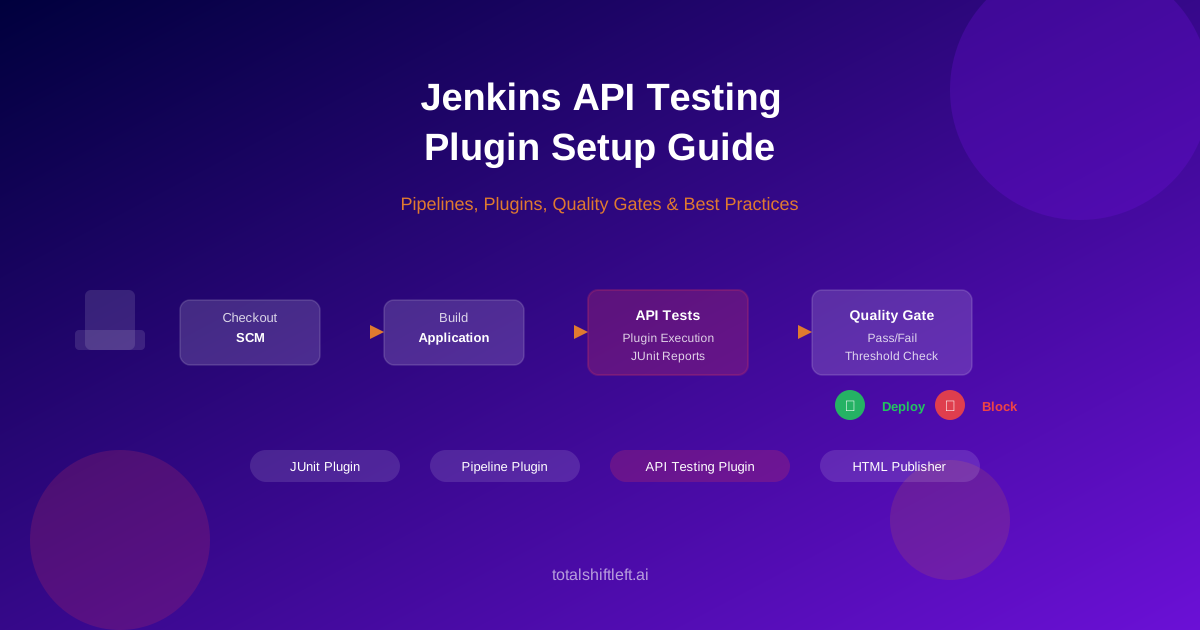
Setting up API testing in Jenkins means installing the right plugins, configuring Jenkinsfile stages for automated test execution, and enforcing quality gates that prevent broken APIs from reaching production.
In This Guide You Will Learn
- What Jenkins API testing involves
- Declarative vs Scripted pipelines for API testing
- Essential plugins for API testing
- Pipeline architecture and stages
- Jenkinsfile configuration walkthrough
- Quality gate setup and enforcement
- Parallel test execution
- Publishing and trending test results
- Shared libraries for reusable test stages
- Real-world implementation example
- Common mistakes and how to avoid them
- Best practices for Jenkins API testing
- Implementation checklist
- Frequently asked questions
Introduction
Jenkins remains one of the most widely adopted CI/CD platforms, powering build and deployment pipelines for organizations of every size. Yet many teams that use Jenkins for compilation and unit testing leave API testing as a manual step, disconnected from the pipeline entirely. The consequence is predictable: API regressions slip through, contract-breaking changes reach staging undetected, and teams spend hours debugging issues that an automated pipeline stage would have caught before the code left the build server.
The gap between running unit tests in Jenkins and running API tests in Jenkins is smaller than most teams expect. With the right plugin combination and a properly structured Jenkinsfile, you can add automated API testing to your existing pipeline in an afternoon. This guide covers the complete setup, from plugin installation through quality gate enforcement, with Jenkinsfile examples you can adapt to your own projects.
For a broader perspective on CI/CD API testing across platforms, see the complete guide to adding API tests to CI/CD pipelines.
What Is Jenkins API Testing?
Jenkins API testing is the practice of executing automated API test suites within Jenkins pipeline stages, publishing the results through JUnit reporting, and using quality gates to control whether builds proceed to downstream environments.
Unlike running API tests locally on a developer workstation, Jenkins-based API testing runs in a controlled, reproducible environment. Every build triggers the same test suite against the same configuration. Results are recorded, trended across builds, and visible to the entire team through the Jenkins dashboard. Most importantly, quality gates enforce minimum pass rates and coverage thresholds programmatically -- no human judgment required to decide whether a build is safe to deploy.
Jenkins API testing integrates naturally with the broader CI/CD API testing strategy that most modern development teams are adopting. Whether you generate tests from an OpenAPI specification or maintain hand-written test suites, Jenkins handles the execution, reporting, and gate enforcement consistently.
Declarative vs Scripted Pipelines
Jenkins supports two pipeline syntaxes, and the choice affects how you structure API testing stages.
Declarative Pipelines
Declarative syntax is the recommended approach for most teams. It enforces a predefined structure with pipeline, stages, stage, and steps blocks. The rigid structure makes pipelines easier to read, review, and maintain. Most Jenkins documentation and plugin examples use declarative syntax.
For API testing, declarative pipelines offer clean separation between test execution (in steps) and post-execution actions like JUnit publishing and notification (in post blocks). The when directive lets you conditionally run API tests only on specific branches or triggers.
Scripted Pipelines
Scripted syntax provides full Groovy programming capabilities within node and stage blocks. Teams choose scripted pipelines when they need complex conditional logic, dynamic stage generation, or programmatic flow control that declarative syntax cannot express.
For API testing, scripted pipelines allow patterns like dynamically generating test stages from a service registry or building test matrices at runtime. However, this flexibility comes at the cost of readability and standardization.
Recommendation: Start with declarative pipelines. Move to scripted only if you hit a specific limitation. The examples in this guide use declarative syntax.
Essential Jenkins Plugins for API Testing
Before configuring your Jenkinsfile, install these plugins through Manage Jenkins > Plugin Manager.
| Plugin | Purpose | Required? |
|---|---|---|
| Pipeline | Enables Jenkinsfile-based pipelines | Yes |
| JUnit Plugin | Parses and displays JUnit XML test results | Yes |
| Credentials Binding | Injects secrets into build steps securely | Yes |
| HTML Publisher | Publishes HTML coverage and detail reports | Recommended |
| Email Extension | Sends formatted failure notifications | Recommended |
| Timestamper | Adds timestamps to console output for debugging | Recommended |
| Pipeline Utility Steps | File operations and readJSON/readYAML steps | Optional |
| HTTP Request | Makes REST API calls from pipeline steps | Optional |
For teams using Total Shift Left, the dedicated Jenkins plugin provides a build step that handles test execution, JUnit output generation, and coverage reporting without manual CLI configuration.
Plugin Installation Steps
Navigate to Manage Jenkins > Plugin Manager > Available tab. Search for each plugin by name and select it. Click Install without restart for plugins that support it, or Download now and install after restart for plugins requiring a restart. Verify installation under the Installed tab.
For air-gapped Jenkins instances, download .hpi files from the Jenkins Plugin Index and upload them through Advanced > Upload Plugin.
Jenkins API Testing Pipeline Architecture
The diagram below shows how API testing stages fit into a Jenkins declarative pipeline, including post-build actions for reporting and notification.
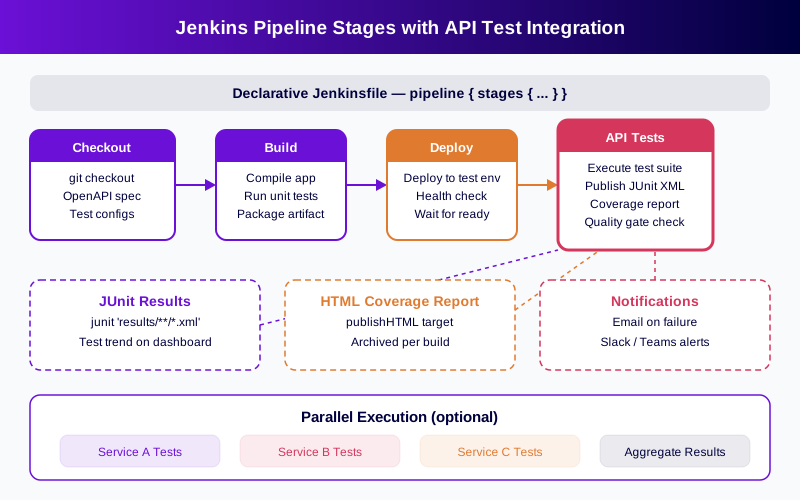
The pipeline follows a five-stage flow:
Stage 1 -- Checkout. Jenkins pulls source code, the OpenAPI specification, and test configuration files from the SCM repository. The OpenAPI spec defines the API contract that tests will validate against.
Stage 2 -- Build. The application compiles, unit tests run, and the build artifact is packaged. API tests depend on a deployable artifact, so this stage must succeed before testing begins.
Stage 3 -- Deploy to Test. The artifact deploys to a dedicated test environment. A health check confirms the API is running and accepting requests before test execution begins. Without this step, API tests would run against a non-responsive endpoint and produce misleading failures.
Stage 4 -- API Tests. The test suite executes against the deployed environment. Tests validate endpoint functionality, schema compliance, error handling, authentication flows, and response performance. Results output to JUnit XML files for publishing.
Stage 5 -- Post Actions. JUnit results are published to the Jenkins dashboard, HTML coverage reports are archived, and notifications fire on failure. Quality gates evaluate pass rates against thresholds and set the build status accordingly.
Ready to shift left with your API testing?
Try our no-code API test automation platform free. Generate tests from OpenAPI, run in CI/CD, and scale quality.
Jenkinsfile Configuration Walkthrough
Here is the structure of a declarative Jenkinsfile with API testing. The pipeline uses environment variables for configuration, credentials binding for secrets, and post-build actions for reporting.
The Jenkinsfile defines a pipeline block with an agent any directive, allowing it to run on any available Jenkins node. Environment variables set the API base URL and test output directory at the pipeline level. The stages section contains five sequential stages.
The Checkout stage uses checkout scm to pull the repository. The Build stage runs your build tool (Maven, Gradle, npm, or similar) to compile the application. The Deploy stage pushes the build to a test environment and runs a health check loop that polls the /health endpoint until the API responds or the timeout expires.
The API Tests stage is where the testing happens. Wrap the test execution command in a withCredentials block to inject API keys or tokens securely. Execute your testing CLI, pointing it at the test environment URL and specifying the JUnit XML output path. If you use Total Shift Left, the plugin provides a dedicated build step that replaces the shell command with a configured UI step.
The post section at the pipeline level handles reporting. The always block publishes JUnit results using the junit step, regardless of whether tests passed or failed. The failure block sends email notifications. The unstable block handles partial failures where some tests passed and some did not.
Key Configuration Points
Credentials management. Never hardcode API keys or tokens in the Jenkinsfile. Use Jenkins Credentials Store and reference them through withCredentials or credentials() in the environment block.
Timeout protection. Wrap the API test stage in a timeout block to prevent hung tests from blocking the pipeline indefinitely. A 20-minute timeout is reasonable for most API test suites.
Agent selection. If your API tests require specific tools (Node.js, Python, Java), use a labeled agent or a Docker agent with the required runtime pre-installed.
Quality Gate Setup and Enforcement
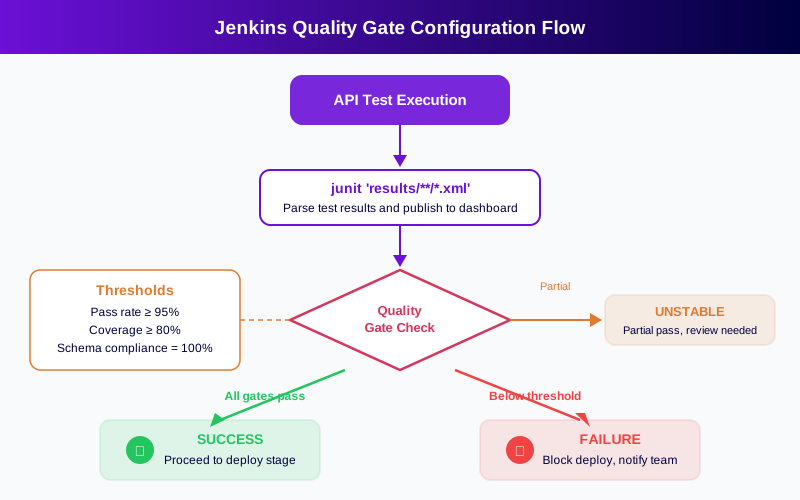
Quality gates transform test results from informational reports into enforceable pass/fail decisions. Without gates, a pipeline that runs API tests but never blocks on failures provides visibility but not protection.
Basic Quality Gate: JUnit Pass/Fail
The simplest quality gate uses the junit step's built-in behavior. When any test in the JUnit XML results has a failure or error element, Jenkins marks the build as UNSTABLE by default. To convert this to a hard FAILURE that blocks deployment, configure the build to treat unstable as failure in your stage conditions.
Threshold-Based Quality Gates
For more nuanced enforcement, implement threshold checks after test execution. A post-test script can parse the JUnit XML to calculate the pass rate percentage. If the pass rate falls below 95%, the script sets the build result to FAILURE. If it falls between 90-95%, the build is marked UNSTABLE as a warning.
Coverage thresholds work similarly. After test execution, query the coverage percentage from your test results or the testing platform API. Compare against your minimum threshold and set the build status accordingly.
Advanced Gate Patterns
Ratcheting thresholds. Store the current pass rate in a file committed to the repository. Each build compares the new pass rate against the stored value. If it drops, the gate fails. If it holds or improves, the gate passes and the new value is stored. This prevents quality regression without requiring teams to hit an absolute number immediately.
Per-endpoint coverage. Instead of a single aggregate coverage number, check that each API endpoint has at least one passing test. This prevents the situation where high overall coverage masks uncovered critical endpoints.
For comprehensive quality gate design patterns, see the API quality gate measurement guide.
Parallel API Test Execution
When your API test suite grows beyond a few minutes, parallel execution reduces pipeline duration. Jenkins declarative pipelines support parallel stages natively using the parallel directive inside a stage.
Splitting Strategies
By service. In microservices architectures, split tests by the API service they target. Each parallel branch runs the test suite for one service. This is the most natural split for teams with clear service boundaries.
By test type. Run functional tests, contract tests, and performance tests in separate parallel branches. Each type may require different tooling or timeout configurations.
By endpoint group. Split a large test suite into groups based on URL path prefixes or functional areas. This works well when a single API has hundreds of endpoints.
Aggregating Parallel Results
Each parallel branch should write JUnit XML results to a separate directory. After all branches complete, a single junit step with a glob pattern (like results/**/*.xml) aggregates all results into one dashboard view. Jenkins merges the test counts, and the test trend chart reflects the combined totals.
Resource Considerations
Parallel execution multiplies resource consumption. Each branch needs a Jenkins executor, and each test suite hits the test environment simultaneously. Ensure your test environment can handle the concurrent load, or use separate test instances per parallel branch.
Publishing and Trending Test Results
JUnit Result Publishing
The junit step is the foundation of test reporting in Jenkins. Point it at your JUnit XML output path and Jenkins displays test results on the build page, including pass/fail/skip counts, individual test case details, and failure stack traces.
Configure healthScaleFactor to control how test failures affect the build health weather icon on the dashboard. A lower value means fewer failures are needed to turn the weather icon to stormy, providing visual indication of quality trends.
HTML Coverage Reports
For detailed coverage visualization beyond JUnit pass/fail, use the HTML Publisher Plugin. Generate an HTML report from your testing tool (most API testing platforms support this) and configure a publishHTML step pointing at the report directory. Jenkins archives the report per build and provides a link on the build sidebar.
Test Trend Analysis
The JUnit Plugin automatically generates test result trend charts on the job dashboard. These charts show pass, fail, and skip counts across builds. A gradually increasing failure count signals accumulating technical debt. A sudden spike indicates a breaking change.
For teams that need deeper analytics, Jenkins exposes build and test data through its REST API. External dashboards like Grafana can pull test metrics from Jenkins and correlate them with deployment frequency, code churn, and incident rates.
Shared Libraries for API Testing
When multiple Jenkins pipelines need API testing, shared libraries eliminate configuration duplication.
Creating a Shared Library
A Jenkins shared library is a Git repository with a specific directory structure: vars/ for global functions and src/ for classes. Create a function like apiTestStage.groovy in the vars/ directory that encapsulates the entire API testing stage -- execution, JUnit publishing, HTML reporting, and quality gate evaluation.
Free 1-page checklist
API Testing Checklist for CI/CD Pipelines
A printable 25-point checklist covering authentication, error scenarios, contract validation, performance thresholds, and more.
Download FreeConfigure the shared library under Manage Jenkins > System > Global Pipeline Libraries. Reference it in any Jenkinsfile with @Library('your-library-name') _ at the top.
Standardization Benefits
Shared libraries enforce consistent API testing practices across all pipelines. When you update the quality gate threshold or add a new reporting step, every pipeline that uses the library gets the change automatically. This is significantly more maintainable than copying and pasting test stages across dozens of Jenkinsfiles.
The library can also standardize environment naming conventions, credential references, and notification channels, reducing the configuration surface area for individual pipeline authors.
Real-World Implementation Example
Consider an e-commerce platform with three APIs: catalog, cart, and checkout. Each API has an OpenAPI specification and is deployed independently.
The team creates a shared library with the apiTestStage function. Each service's Jenkinsfile calls this function with service-specific parameters: the OpenAPI spec path, the test environment URL, and the minimum coverage threshold.
The catalog service pipeline runs 180 tests in 4 minutes. The cart service runs 95 tests in 2 minutes. The checkout service runs 210 tests (including payment flow validations) in 6 minutes.
Quality gates are configured at 95% pass rate and 85% endpoint coverage. When a developer pushes a change that removes a required field from the catalog response, the contract validation tests fail immediately. The pipeline marks the build as FAILURE, blocks the deployment, and sends a Slack notification with the specific failing test names.
Before implementing Jenkins API testing, this team averaged 3.2 API-related production incidents per month. After six months with automated gates, the rate dropped to 0.4 incidents per month. The pipeline catches contract violations, missing error handlers, and authentication regressions before they leave the build server.
For teams testing across multiple CI/CD platforms, see the Azure DevOps API testing pipeline guide for a comparison of how the same patterns apply in Azure DevOps.
Common Mistakes and How to Avoid Them
Hardcoding test environment URLs. Pipeline variables and Jenkins environment configuration should control where tests run. Hardcoded URLs break when environments change or when running the same pipeline against different targets.
Skipping the health check before tests. If your test environment is still starting up when the API test stage begins, you get transient connection failures that look like test failures. Always include a health check loop with a timeout between the deploy stage and the test stage.
Using UNSTABLE instead of FAILURE for quality gates. Jenkins UNSTABLE status does not block downstream stages by default. If you want API test failures to actually prevent deployment, you need to either set the build to FAILURE or add when conditions to downstream stages that check the build status.
Not archiving test artifacts. JUnit XML files and HTML reports should be archived so they are available for debugging after the workspace is cleaned. Use archiveArtifacts in addition to junit and publishHTML.
Running all tests on every commit. Large test suites slow down feedback. Implement tiered testing -- smoke tests on every commit, full suites on PR merges, comprehensive validation pre-deployment.
Ignoring flaky tests. A test that fails intermittently erodes trust in the pipeline. Teams start ignoring quality gate failures because they assume it is just the flaky test again. Quarantine flaky tests into a separate suite, fix them, and then reintroduce them. For patterns on handling regression in test suites, see the API regression testing guide.
Best Practices for Jenkins API Testing
-
Use declarative pipelines for API testing stages. The structured syntax makes pipelines reviewable and reduces configuration errors.
-
Version your Jenkinsfile alongside application code. Pipeline changes should go through the same code review process as application changes.
-
Centralize common configuration in shared libraries. Quality gate thresholds, notification channels, and reporting steps should be defined once and consumed by all pipelines.
-
Implement tiered testing. Tier 1 (every commit): smoke tests under 5 minutes. Tier 2 (PR merge): full endpoint coverage in 10-20 minutes. Tier 3 (pre-deployment): load tests, security scans, and full regression in 30-60 minutes.
-
Set conservative quality gates initially and ratchet upward. Starting at 90% pass rate and increasing by 2-3% per sprint is sustainable. Jumping to 100% immediately causes teams to disable gates.
-
Monitor pipeline duration trends. Track how long the API test stage takes across builds. A creeping increase signals growing test suites that need parallelization or pruning.
-
Isolate test data per run. Tests that share mutable state become flaky. Each test should create its own data, execute, and clean up independently.
-
Use Docker agents for reproducibility. Define the test execution environment in a Dockerfile, and use the
dockeragent directive to ensure consistent tooling across all builds. -
Integrate with your team's notification flow. Jenkins should notify through the channels your team already monitors -- Slack, Teams, or email -- not just the Jenkins dashboard.
-
Generate tests from your OpenAPI specification to achieve broad coverage quickly. Platforms like Total Shift Left let you import a spec and produce CI-ready tests without writing test code.
Implementation Checklist
Use this checklist when setting up or auditing your Jenkins API testing pipeline:
- ✔ Jenkins Pipeline Plugin and JUnit Plugin installed and verified
- ✔ Credentials Binding Plugin installed for secret injection
- ✔ Jenkinsfile created with dedicated API testing stage
- ✔ Test environment URL configured through pipeline variables (not hardcoded)
- ✔ API credentials stored in Jenkins Credentials Store and referenced via
withCredentials - ✔ Health check step added between deploy and test stages
- ✔ JUnit XML results published using
junitstep with correct glob pattern - ✔ HTML coverage report published using HTML Publisher Plugin
- ✔ Quality gate configured to fail builds below pass rate threshold
- ✔ Timeout block wrapping API test stage (recommended: 20 minutes)
- ✔ Test artifacts archived for post-build debugging
- ✔ Email or Slack notifications configured for test failures
- ✔ Parallel execution configured for suites exceeding 5-minute target
- ✔ Shared library created for multi-pipeline API testing standardization
- ✔ Tiered testing strategy implemented across commit, merge, and deploy triggers
- ✔ Pipeline definition version-controlled and reviewed through pull requests
Ready to automate API testing in your Jenkins pipeline? Start a free 15-day trial to generate CI-ready tests from your OpenAPI specification in minutes. Solo developer? Get the free Citizen Developer Edition — single-user, no expiry. See pricing plans for team and enterprise options.
See also: contract testing in our learn hub for the underlying concept.
Frequently Asked Questions
What Jenkins plugins are needed for API testing?
The essential plugins are the Pipeline Plugin (for Jenkinsfile support), JUnit Plugin (for test result publishing), and Credentials Binding Plugin (for secure secret injection). For enhanced reporting, add HTML Publisher for coverage reports and Email Extension for failure notifications. Teams using Total Shift Left can install the dedicated Jenkins plugin for integrated test execution.
How do I run API tests in a Jenkinsfile?
Add a stage to your declarative Jenkinsfile that executes your API test suite using a shell step or a dedicated plugin build step. The stage should inject credentials through withCredentials, execute the test runner CLI with the target URL and output path, and include a junit post step to publish results. Wrap the stage in a timeout block to prevent hung tests from stalling the pipeline.
How do I set up quality gates in Jenkins for API tests?
The simplest approach uses the junit step's default behavior, which marks the build UNSTABLE on any test failure. For threshold-based gates, add a post-test script that parses JUnit XML results, calculates the pass rate, and sets currentBuild.result = 'FAILURE' when the rate falls below your threshold. Advanced teams use the ratcheting pattern, where the threshold automatically increases as coverage improves.
Can Jenkins run API tests in parallel?
Yes. Use the parallel directive inside a declarative pipeline stage to define multiple branches that execute simultaneously. Each branch runs a subset of the test suite and publishes its own JUnit XML results to a separate directory. After all branches complete, a single junit step with a glob pattern aggregates the results into one unified dashboard view.
How do I view API test trends in Jenkins?
The JUnit Plugin automatically generates test result trend charts on the job dashboard, showing pass, fail, and skip counts over time. For richer analytics, publish HTML coverage reports using the HTML Publisher Plugin. For cross-pipeline visibility, use the Jenkins REST API to export test metrics to external dashboards like Grafana.
Ready to shift left with your API testing?
Try our no-code API test automation platform free.