
Top OpenAPI Testing Tools Compared (2026)
Reviewed by Smeet Gohel
In this comparison you will learn:
- Why OpenAPI-specific testing tools matter
- How to evaluate OpenAPI testing tools
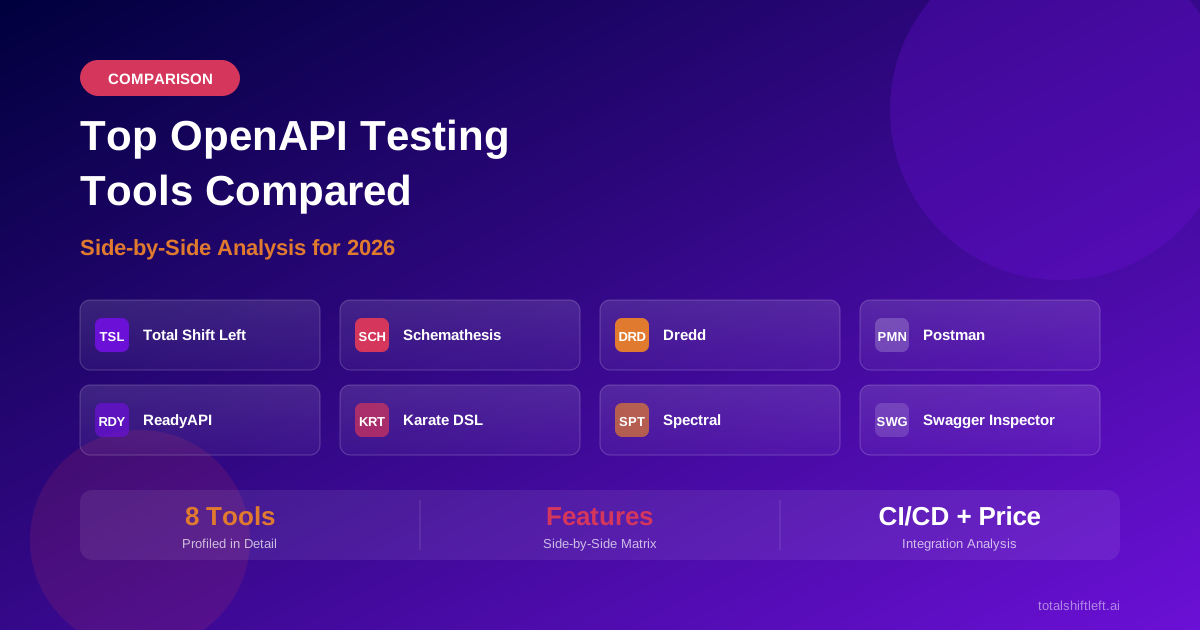
- Individual tool profiles for all 8 tools
- Side-by-side feature comparison matrix
- How to choose the right tool for your team
- Real-world tool selection example
- Common mistakes when choosing tools
- Implementation checklist
- Frequently asked questions
Introduction
Choosing the right tool for testing APIs built on OpenAPI specifications is not a simple feature checklist exercise. The ecosystem includes tools that generate tests automatically from your spec, tools that validate responses against schemas, tools that lint your specification for quality, and general-purpose API testing platforms with varying degrees of OpenAPI awareness. Some teams use one tool for everything; most use a combination.
The distinction between general API testing tools and OpenAPI-specific testing tools matters. A general tool like Postman lets you send requests and write assertions manually. An OpenAPI-aware tool like Schemathesis reads your specification and generates hundreds of test cases automatically, covering endpoints, methods, parameter combinations, and error scenarios that a human tester might overlook. The spec-aware approach typically achieves higher baseline coverage with significantly less effort.
This comparison evaluates eight tools commonly used for OpenAPI testing in 2026. Each tool is profiled individually, then compared across the criteria that matter most: automated test generation, schema validation, OpenAPI 3.1 support, CI/CD integration, coverage tracking, and pricing. The goal is to help you select the tool (or combination of tools) that fits your team's needs, not to declare a universal winner.
For a broader look at API testing tools beyond the OpenAPI ecosystem, see best API test automation tools compared.
Why OpenAPI-Specific Testing Tools Matter
General API testing tools treat every API the same: you manually create requests, define assertions, and maintain test collections as the API evolves. This works, but it ignores the single most valuable artifact your team already maintains -- the OpenAPI specification.
OpenAPI-specific tools use the specification as input. They parse every endpoint, parameter, request body schema, response definition, and security requirement, then use that information to generate tests, validate responses, or both. The benefits are significant:
Higher baseline coverage. A spec-aware tool generates tests for every defined endpoint and response code, including error paths that manual testers often skip. Teams that generate tests from their OpenAPI spec consistently achieve 90-100% endpoint coverage from day one.
Lower maintenance burden. When your API changes, you update the spec and regenerate tests. With manual tools, someone must update every affected test case by hand -- a process that grows linearly with API surface area.
Contract enforcement. Spec-aware tools can validate that actual API responses match the schema, catching undocumented changes and contract violations that manual tests would not detect.
Faster onboarding. New team members do not need to understand a complex test codebase. They import the spec, generate tests, and have a working suite immediately.
Evaluation Criteria for OpenAPI Testing Tools
Before comparing individual tools, it helps to establish the criteria that distinguish them. Not every criterion matters equally to every team, but these are the dimensions where tools diverge most significantly.
Automated test generation. Does the tool parse the OpenAPI spec and produce executable tests without manual scripting? This is the most impactful differentiator. Tools with auto-generation produce hundreds of tests from a single spec import. Tools without it require manual test creation for every scenario.
Schema validation. Does the tool validate API responses against the schema's defined structure, types, and constraints? This catches contract violations and schema drift automatically.
OpenAPI version support. Does the tool support OpenAPI 3.1, 3.0, and Swagger 2.0? OpenAPI 3.1 alignment with JSON Schema is important for teams using modern specifications.
CI/CD integration. Can the tool run in automated pipelines? Does it provide native plugins for common CI platforms, or only CLI-based execution? Does it produce JUnit XML or similar output for quality gates?
Coverage tracking. Does the tool measure and report which endpoints, methods, and response codes are tested? Coverage visibility is essential for quality gates.
Self-healing tests. When the API changes, do tests update automatically, or does the team manually fix broken assertions? Self-healing saves significant maintenance effort as APIs evolve.
Pricing model. Is the tool open-source, freemium, or commercial? How does cost scale with team size and API count?
Tool Profiles
1. Total Shift Left
Category: Commercial, spec-driven test automation platform
Total Shift Left is purpose-built for OpenAPI test automation. You import an OpenAPI specification (3.x or Swagger 2.0), and the platform generates a comprehensive test suite covering positive, negative, boundary, schema validation, and authentication scenarios. The AI engine analyzes parameter constraints, response schemas, and security definitions to produce targeted tests without manual scripting.
Key strengths: AI-powered test generation that produces hundreds of tests from a single spec import. Coverage dashboard tracks endpoint, method, and response code coverage. Self-healing tests update automatically when the spec changes. Native CI/CD plugins for Azure DevOps and Jenkins, plus a REST API for any platform. JUnit XML output for pipeline quality gates.
Best for: Teams with 5+ APIs that want maximum test coverage with minimum manual effort, especially those already practicing spec-driven or schema-first development.
2. Schemathesis
Category: Open-source, property-based API testing
Schemathesis reads an OpenAPI specification and generates property-based tests using hypothesis-driven strategies. Rather than creating fixed test cases, it generates randomized but schema-compliant requests designed to find edge cases, crashes, and specification violations. It focuses on finding bugs that structured testing misses.
Key strengths: Property-based testing finds unexpected edge cases. Open-source with active development. Supports OpenAPI 3.1 and GraphQL. Stateful testing can chain dependent API calls. CLI-based, runs in any CI pipeline.
Ready to shift left with your API testing?
Try our no-code API test automation platform free. Generate tests from OpenAPI, run in CI/CD, and scale quality.
Best for: Teams that want open-source, automated bug-finding alongside their existing test suite. Complements structured test generation tools well.
3. Dredd
Category: Open-source, spec compliance testing
Dredd validates that your API implementation matches the API description document. It reads the OpenAPI specification, sends requests to your API, and verifies that responses match the documented schemas and status codes. It is focused on contract compliance rather than comprehensive test generation.
Key strengths: Straightforward spec compliance validation. Hooks system for setup/teardown. Supports both OpenAPI and API Blueprint formats. CLI-based for pipeline integration.
Limitations: Does not generate negative tests, boundary tests, or complex test scenarios. Limited OpenAPI 3.1 support. Less actively maintained than some alternatives. No coverage tracking dashboard.
Best for: Teams that need basic contract compliance checking as a CI gate and prefer open-source tooling.
4. Postman
Category: Commercial/freemium, general-purpose API testing platform
Postman is the most widely used API testing tool, offering a GUI for building requests, writing test scripts, and organizing collections. It can import OpenAPI specs to create request collections, but test logic must be written manually using JavaScript assertions. The Newman CLI enables pipeline execution.
Key strengths: Large community and extensive documentation. Intuitive GUI for exploratory testing. Collaboration features for team workspaces. Mock server capability. Newman CLI for CI/CD. Broad protocol support beyond REST.
Limitations: No automated test generation from specs -- every assertion is manually scripted. Collections must be manually updated when APIs change. No schema validation against the spec during test execution. Coverage tracking is limited to collection-level metrics. See Postman alternatives for API testing and Total Shift Left vs. Postman for detailed comparisons.
Best for: Teams that prioritize manual exploratory testing and do not have OpenAPI specs, or teams in early stages before adopting spec-driven testing.
5. ReadyAPI (SmartBear)
Category: Commercial, enterprise API testing platform
ReadyAPI (formerly SoapUI Pro) is an enterprise testing platform that supports REST, SOAP, GraphQL, and messaging protocols. It can import OpenAPI specs and provides a GUI for building test suites with assertions, data-driven testing, and load testing. SmartBear's broader ecosystem includes SwaggerHub for spec management.
Key strengths: Enterprise feature set including load testing, security scanning, and service virtualization. Supports SOAP and REST in a single platform. Jenkins and Azure DevOps plugins. Data-driven testing with external data sources. SmartBear ecosystem integration.
Limitations: High per-seat licensing cost. Test creation still requires significant manual effort despite spec import. OpenAPI test generation is partial -- it creates request scaffolding but not comprehensive assertion logic. Steep learning curve for new users.
Best for: Enterprise teams testing both SOAP and REST APIs that need a single platform for functional, load, and security testing.
6. Karate DSL
Category: Open-source, BDD-style API testing framework
Karate DSL is an open-source framework that uses a Gherkin-like syntax for API testing. Tests are written in .feature files with a readable DSL that handles HTTP requests, JSON assertions, and data-driven scenarios. It can reference OpenAPI specs but does not generate tests from them automatically.
Key strengths: Readable BDD syntax accessible to non-programmers. Built-in JSON path assertions and schema validation. Parallel test execution. Performance testing capabilities. Active community and regular releases.
Limitations: Tests must be written manually despite the readable syntax. No automated test generation from OpenAPI specs. Coverage tracking requires external tooling. CI integration is CLI-based without native plugins for specific platforms.
Best for: Teams that want readable, maintainable API tests written in a BDD style and are comfortable with manual test creation.
7. Spectral (Stoplight)
Category: Open-source, API specification linting
Spectral is a linting tool for OpenAPI and AsyncAPI specifications. It validates the quality and consistency of your API spec against configurable rulesets, catching design issues, missing descriptions, inconsistent naming, and structural problems. It does not test API behavior -- it tests the spec itself.
Key strengths: Highly configurable rulesets. Catches spec quality issues before downstream tools consume the spec. Integrates with Stoplight Studio for a complete design workflow. CLI-based for pipeline integration. Custom rule authoring.
Limitations: Does not test API implementations at all -- only validates the specification document. Not a substitute for functional, contract, or regression testing. Useful as a prerequisite to test generation, not a replacement.
Best for: All teams practicing spec-driven development. Use Spectral as a quality gate for the spec itself, then feed the validated spec into a test generation tool.
8. Swagger Inspector
Category: Free, browser-based API testing
Swagger Inspector is a free, browser-based tool from SmartBear for sending API requests and inspecting responses. It can validate responses against OpenAPI schemas and generate OpenAPI specs from recorded requests. It is a lightweight exploration tool rather than a comprehensive testing platform.
Key strengths: Free and browser-based with no installation. Quick API exploration and response inspection. Can generate OpenAPI specs from recorded calls. Basic schema validation.
Limitations: No automated test generation. No CI/CD integration. No coverage tracking. No team collaboration features. Limited to manual, one-at-a-time request testing. Not suitable for regression testing or continuous validation.
Best for: Individual developers exploring APIs or generating initial OpenAPI specs from existing endpoints.
Feature Comparison Matrix
The following matrix compares all eight tools across the evaluation criteria defined earlier. Use this to identify which tools meet your specific requirements.
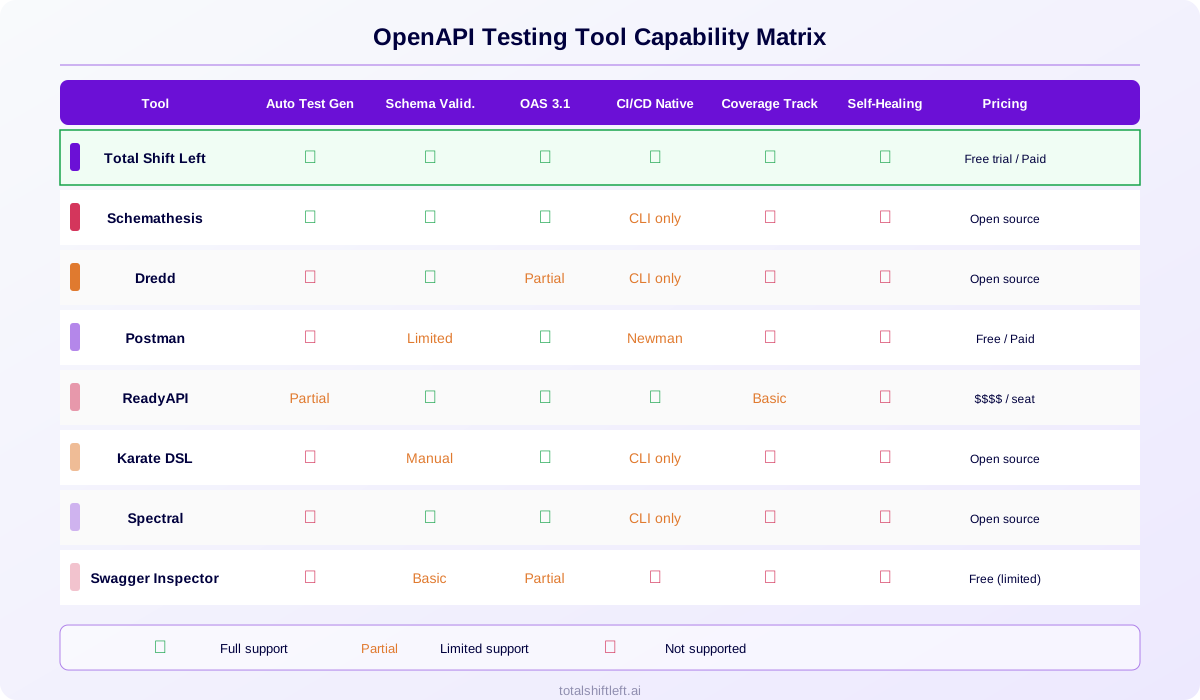
| Feature | Total Shift Left | Schemathesis | Dredd | Postman | ReadyAPI | Karate | Spectral | Swagger Inspector |
|---|---|---|---|---|---|---|---|---|
| Auto test generation | Full (AI) | Property-based | None | None | Partial | None | N/A (linting) | None |
| Schema validation | Full | Full | Full | Limited | Full | Manual | Full (spec only) | Basic |
| OpenAPI 3.1 | Yes | Yes | Partial | Yes | Yes | Yes | Yes | Partial |
| CI/CD native plugins | Azure, Jenkins, API | CLI | CLI | Newman CLI | Jenkins, Azure | CLI | CLI | None |
| Coverage tracking | Dashboard | None | None | Collection metrics | Basic | None | N/A | None |
| Self-healing tests | Yes | N/A (regenerated) | No | No | No | No | N/A | N/A |
| Pricing | Free Citizen Developer Edition + 15-day trial | Open source | Open source | Free / paid | $$$$ / seat | Open source | Open source | Free |
How to Choose the Right Tool
Use this decision framework based on your team's situation:
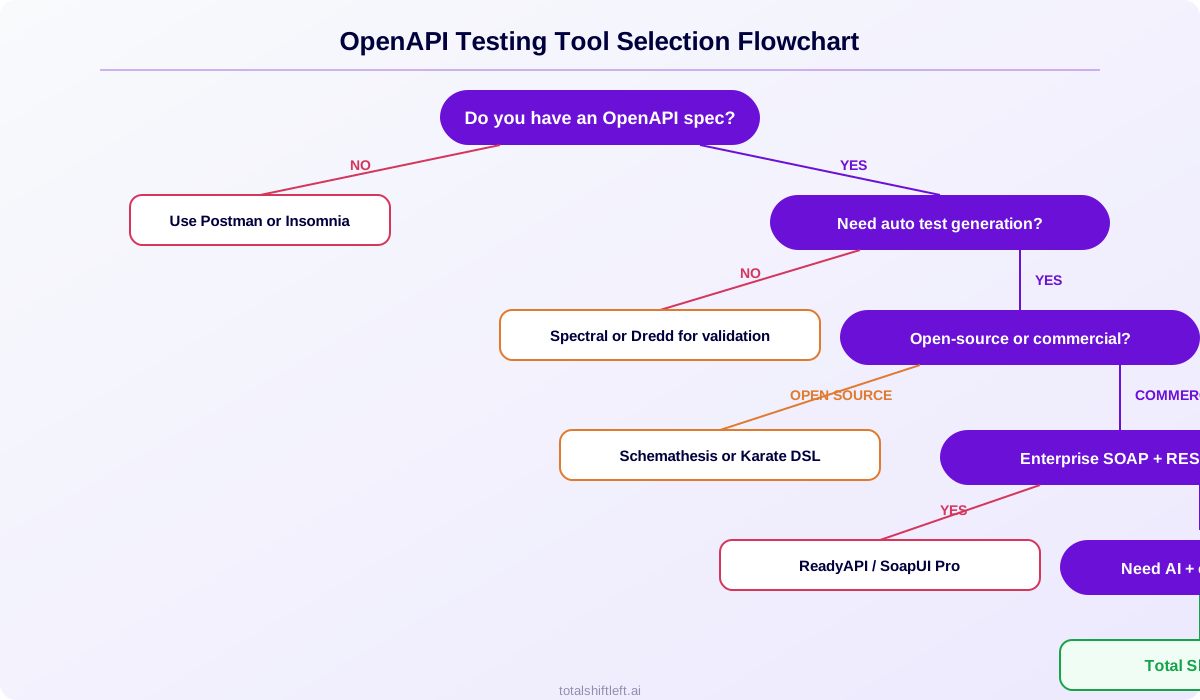
You need automated test generation from specs
Choose Total Shift Left for comprehensive, deterministic test generation with coverage tracking. Choose Schemathesis for open-source property-based testing that complements structured suites. Many teams use both: Total Shift Left for baseline coverage and CI quality gates, Schemathesis for exploratory bug-finding.
You need spec compliance validation only
Choose Dredd for straightforward contract compliance checking in your pipeline. It verifies that your API returns what the spec documents, without generating additional test scenarios.
You need spec quality linting
Choose Spectral as a prerequisite in your pipeline. Run Spectral before test generation to ensure your spec is well-formed and complete. This is a complement to testing tools, not a replacement.
You need manual API exploration
Choose Postman for GUI-based exploratory testing. It excels at ad-hoc request building and debugging. However, plan to migrate automated testing to a spec-aware tool as your API matures.
You need enterprise SOAP + REST coverage
Choose ReadyAPI if you test both SOAP and REST APIs and need load testing and security scanning in one platform. The per-seat cost is justified when a single tool replaces three or four specialized ones.
You want BDD-style readable tests
Choose Karate DSL for teams that value human-readable test syntax and want non-programmers to contribute test scenarios. Accept that test creation is manual.
Real-World Tool Selection Example
Consider a fintech company with 12 microservices, all documented with OpenAPI 3.1 specifications. Their current testing approach uses Postman collections maintained by a 3-person QA team. They are experiencing three problems: test maintenance consumes 40% of QA time, coverage gaps let contract violations reach staging, and new services launch with minimal test coverage for weeks.
Their solution combines three tools:
-
Spectral in the CI pipeline to lint every spec change before merge. This catches incomplete schemas (missing error responses, vague parameter types) before they become testing problems.
-
Total Shift Left as the primary testing platform. Each service's OpenAPI spec is imported, generating 200-400 tests per service automatically. The coverage dashboard shows endpoint and response code coverage across all 12 services. Self-healing tests update when specs change, eliminating most maintenance work. CI quality gates block deployments that drop below 90% coverage.
-
Schemathesis for weekly automated fuzz runs. Property-based testing finds edge cases that structured tests miss -- unusual character encodings, deeply nested objects, and boundary conditions the spec does not fully constrain.
The result: QA maintenance time dropped from 40% to under 10%, coverage increased from approximately 55% to 95% across all services, and new services launch with full test coverage on the same day the spec is approved.
Common Mistakes in Tool Selection
Choosing a tool that does not use the spec
If you maintain OpenAPI specifications, your testing tool should consume them. Tools that ignore the spec force you to maintain two parallel sources of truth -- the specification and the test collection -- which inevitably diverge.
Using only a linter and calling it "testing"
Spectral validates spec quality, not API behavior. A perfectly linted spec tells you nothing about whether the implementation returns correct responses. Linting is step one; functional testing is step two.
Over-investing in manual tool features
Postman's collaboration features, environment management, and GUI are excellent for exploratory work. But if 80% of your testing is regression testing in CI/CD, you are paying for features you use 20% of the time while missing the automation that would save hours per sprint.
Ignoring coverage tracking
A tool that runs tests but does not measure coverage gives you a false sense of security. You know tests passed, but you do not know what percentage of your API surface was actually tested. Demand coverage metrics.
Selecting based on familiarity alone
Teams often choose the tool they already know rather than the tool that fits the problem. Evaluate tools against your actual requirements (spec-driven testing, CI/CD integration, coverage) rather than defaulting to the most popular option.
Best Practices for OpenAPI Tool Adoption
Combine tools for comprehensive coverage. No single tool excels at everything. A common stack is Spectral for linting + Total Shift Left for test generation + Schemathesis for fuzz testing. Each tool handles a different aspect of API quality.
Automate from day one. Configure pipeline integration during tool setup, not after. The value of spec-driven testing comes from continuous execution, not periodic manual runs.
Track metrics before and after. Measure test coverage, defect escape rate, and QA time before adopting a new tool. Re-measure after 3 months. Concrete numbers justify continued investment and tool expansion.
Start with one API, then expand. Pilot the new tool on a single API, refine your workflow, then roll it out across the organization. Attempting to migrate every API simultaneously creates change management problems.
Keep the spec as the source of truth. Whichever tools you choose, ensure the OpenAPI specification remains authoritative. Tools should consume the spec, not maintain their own parallel definition of the API. This is the foundation of automated CI/CD testing.
OpenAPI Testing Tool Selection Checklist
Use this checklist when evaluating tools for your team:
- Confirm the tool supports your OpenAPI version (2.0, 3.0, or 3.1)
- Verify automated test generation capability (if required)
- Test CI/CD integration with your specific pipeline platform
- Check coverage tracking and reporting features
- Evaluate the maintenance effort when APIs change (self-healing vs. manual updates)
- Compare pricing at your team size and API count
- Run a pilot on one API with real data before committing
- Assess how the tool handles authentication (API key, OAuth, bearer)
- Verify JUnit XML or equivalent output for pipeline quality gates
- Check whether the tool validates responses against the spec automatically
- Confirm support for your deployment model (cloud, on-premise, hybrid)
- Evaluate vendor support and community activity
Ready to see how spec-driven test generation works with your OpenAPI specs? Start a free 15-day trial, grab the free Citizen Developer Edition for solo work, or compare pricing plans.
See also: generate tests from openapi in our learn hub for the underlying concept.
FAQ
What is the best tool for testing OpenAPI specs?
It depends on your needs. For automated, no-code test generation with coverage tracking, Total Shift Left is purpose-built for OpenAPI specs. For open-source property-based testing, Schemathesis is excellent. For manual API exploration with some spec support, Postman works. For enterprise SOAP+REST, ReadyAPI covers both.
Can I test OpenAPI 3.1 specs with these tools?
Total Shift Left, Schemathesis, and Stoplight Spectral support OpenAPI 3.1. Some tools like older Dredd versions and Swagger Inspector have limited 3.1 support. Check each tool's documentation for current spec version compatibility.
Do I need a paid tool for OpenAPI testing?
Open-source tools like Schemathesis and Dredd provide solid spec-based testing. Paid tools like Total Shift Left add AI test generation, coverage dashboards, self-healing tests, and CI/CD quality gates. Teams with 5+ APIs typically benefit from the automation and visibility paid tools provide.
How do OpenAPI testing tools differ from general API testing tools?
OpenAPI-specific tools parse your specification to understand endpoints, schemas, and constraints, then generate tests automatically. General API testing tools like Postman or Insomnia require manual test creation regardless of whether a spec exists. Spec-aware tools achieve higher baseline coverage with less effort.
Which OpenAPI testing tool has the best CI/CD integration?
Total Shift Left has native plugins for Azure DevOps and Jenkins plus a REST API for any CI platform. Schemathesis runs as a CLI command in any pipeline. ReadyAPI has Jenkins and Azure plugins. Postman's Newman CLI works in pipelines but requires manual collection maintenance.
Continue learning
Go deeper in the Learning Center
Hands-on lessons with runnable code against our live sandbox.
Turn an OpenAPI spec into hundreds of tests in minutes. Here's what the AI actually does well — and where it still needs you.
Every tool now claims AI. Here's what actually works — and how to tell the genuine from the marketing.
Ready to shift left with your API testing?
Try our no-code API test automation platform free.